
Duplicate payments aren’t rare. Finance teams at mid-size and large companies pay the same invoice twice with surprising regularity. The mechanics differ, but the pattern holds: an invoice enters your system through multiple channels, or gets keyed in twice, or bypasses controls that would normally catch it.
The reason these duplicates persist isn’t poor software. Most ERP platforms have duplicate detection built in. The problem is that standard detection only catches exact matches—same vendor, same invoice number, same amount. Real-world duplicates rarely look identical in your system.
How Duplicates Enter Your System
Invoice receipt is messier than process maps suggest. A supplier emails an invoice to your AP mailbox. Your buyer also received a copy and forwarded it to approvals. The supplier’s portal auto-generates a PDF that your procurement team downloads. Now you have three instances of the same invoice, possibly with different filenames, slightly different amounts if one includes tax and another doesn’t, or minor date variations.
Your AP clerk keys in the first one. Two weeks later, a different clerk processes what appears to be a new invoice. If your vendor master data shows the supplier under multiple names—”ABC Company,” “ABC Co,” “ABC Company Ltd”—your ERP sees these as different vendors. Standard duplicate checks fail.
Timing gaps create duplicates. An invoice arrives before the goods receipt posts in your system. Your three-way match fails. Pressure to pay on time leads to a manual PO bypass. The invoice gets paid. Later, someone reconciles the original PO, processes the same invoice again through the standard workflow, and pays it a second time.
Why Controls Miss Duplicates
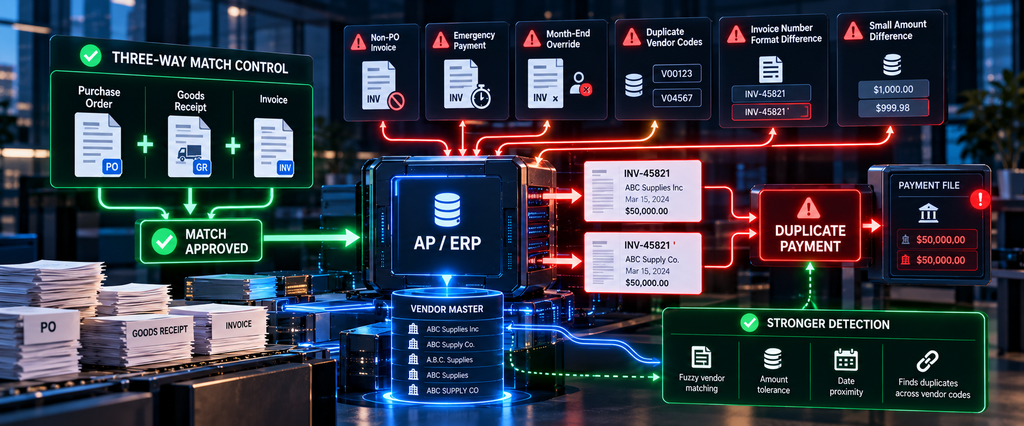
Three-way matching prevents most duplicates when enforced. The control is straightforward: match purchase order to goods receipt to invoice, pay only when all three align, never pay the same PO line twice.
The gap is enforcement. Non-PO invoices bypass matching. Emergency payments bypass matching. Month-end or quarter-end processing pressure leads approvers to override blocks. Each workaround creates duplicate risk.
Your duplicate detection settings matter more than most finance teams realize. Default configurations check for exact invoice number matches from the same vendor code. If your vendor appears under two codes in your master data, this check fails. If the invoice number has a trailing space in one entry and not the other, the check fails. If the amounts differ by a few cents due to rounding or exchange rate timing, the check fails.
Approval routing introduces duplicates when responsibility fragments. One approver sees an invoice, delays, and the requester resubmits it through a different path. Both approvals process in parallel. Payment runs separately, and both invoices clear.
Practical Prevention Steps
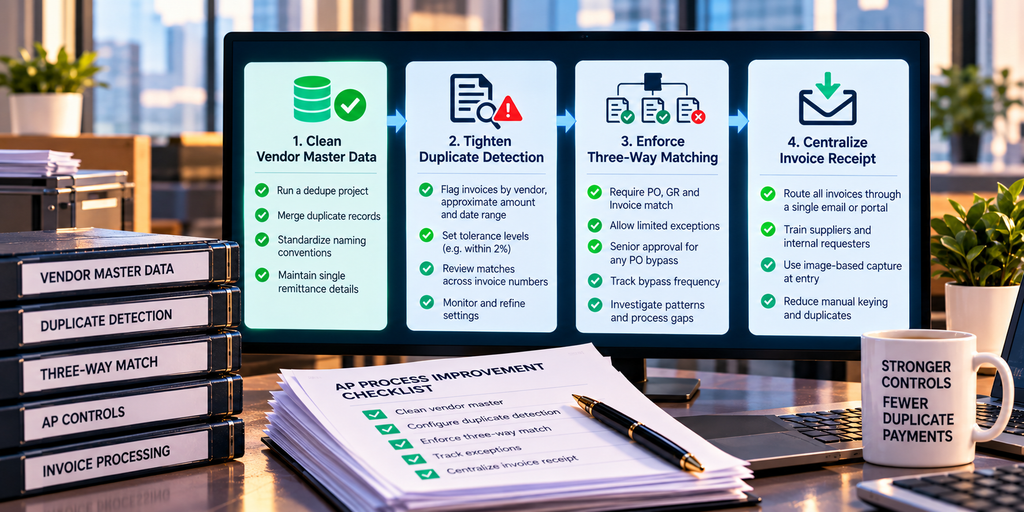
Clean vendor master data eliminates most duplicate payment risk. Run a dedupe project on your vendor file. Merge records for the same legal entity. Standardize naming conventions. Establish a single source of truth for each supplier’s remittance details.
Tighten your duplicate detection parameters. Configure your ERP to flag invoices that match on vendor, approximate amount, and date range, even if invoice numbers differ. Set tolerance levels—flag anything within 2% of a prior invoice from the same vendor in the past 90 days.
Enforce three-way matching with limited exceptions. Require senior approval for any PO bypass. Track bypass frequency and investigate patterns. If one buyer or department bypasses controls repeatedly, you’ve found a process gap.
Centralize invoice receipt. Route all invoices through a single email address or portal. Train suppliers and internal requesters to use that channel exclusively. Image-based systems that capture invoices at entry reduce duplicate keying.
Reconcile your payment files against invoice history before releasing payments. A final check that scans for near-duplicates across the payment batch catches issues that earlier controls missed.
Recovery as a Control Test
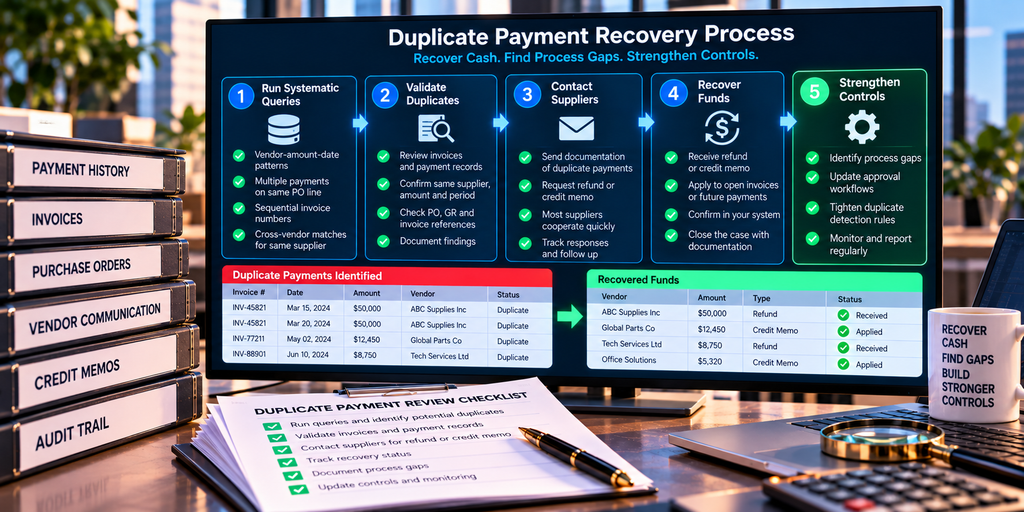
Periodic duplicate payment reviews serve two purposes. They recover cash, and they identify where your controls failed. Each duplicate you find points to a process gap.
Systematic recovery means running structured queries against your payment history. Look for vendor-amount-date patterns, multiple payments against the same PO line, and sequential invoice numbers from the same supplier. Validate each potential duplicate before contacting vendors.
Most suppliers refund duplicates promptly once notified. The friction is internal—pulling together proof of duplicate payment, vendor contact information, and follow-through to confirm the credit or refund gets applied.
If you’re processing tens of thousands of invoices monthly and haven’t run a duplicate review in the past year, you’re leaving money unclaimed. Fintralis runs contingency-based duplicate recovery across SAP, Oracle and JD Edwards environments, so finance teams recover cash without adding fixed costs or internal workload.
Frequently asked questions
What causes duplicate payments in accounts payable?
Duplicate payments typically result from poor vendor master data, missing three-way matching, timing gaps between invoice receipt channels, approval bypass workarounds, and lack of automated duplicate detection before payment. Most originate from process design rather than software failure.
How much do companies lose to duplicate payments?
Loss rates vary by AP volume and control maturity. Companies without systematic duplicate detection often find that recovered duplicates represent less than 1% of annual spend, but that still translates to significant dollar amounts at scale, particularly for organisations processing tens of thousands of invoices monthly.
What is three-way matching and does it prevent duplicate payments?
Three-way matching compares purchase orders, goods receipts, and invoices before payment authorization. When enforced, it prevents most duplicates because the system won’t pay the same PO line twice. However, many duplicates bypass matching through emergency payments, non-PO invoices, or manual overrides.
Can ERP systems automatically detect duplicate invoices?
Modern ERPs have duplicate detection built in, but default settings often check only exact invoice number matches from the same vendor. Variations in supplier names, amounts, dates, or invoice formats routinely bypass standard detection. Effective prevention requires configuration and supplementary tools.
Who is responsible for preventing duplicate payments?
Accounts payable owns invoice processing controls, but duplicate prevention requires collaboration. Procurement maintains clean vendor records, warehouse teams record receipts promptly, approvers enforce purchase order discipline, and treasury reviews payment files. Fragmented accountability creates gaps.
How do you recover duplicate payments after they occur?
Recovery starts with identification through payment history analysis. Finance then validates each duplicate, contacts vendors for refund or credit, tracks recovery status, and reconciles returned funds. Systematic recovery programmes review historical payments periodically rather than waiting for vendors to self-report overpayments.