

Most finance teams invest in controls to prevent duplicate payments going forward. Almost none calculate how many duplicates they’ve already paid. That’s a gap, because the exposure sitting in your historical payment data represents actual cash your company can recover now.
Calculating duplicate payment exposure doesn’t require a full audit. You need three inputs: your annual AP spend, a sample of recent payment data from your ERP, and a basic understanding of how duplicates occur in your specific environment.
Start With a Baseline Range
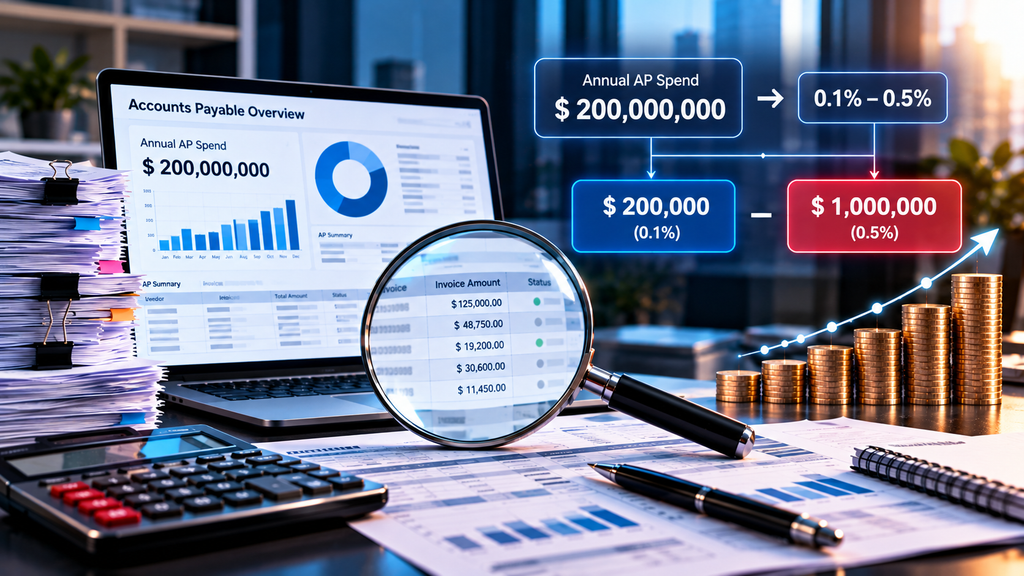
Take your total annual AP spend and multiply it by 0.1% to 0.5% to establish a rough range. If you process $200M in annual payments, that suggests $200,000 to $1,000,000 in potential exposure.
This range is not scientific. It reflects observed rates across different ERP environments and control maturity levels. Your actual rate depends on invoice volume, approval workflows, vendor file hygiene, and how many people can create or modify vendor records.
The baseline gives you a materiality threshold. If the low end of the range is worth investigating, continue. If not, you’ve answered the question.
Pull a Payment Sample From Your ERP
Extract 12 to 24 months of payment history with these fields: vendor name, vendor ID, invoice number, invoice date, invoice amount, payment amount, payment date, and currency if you operate internationally.
The sample should include all payment types processed through your AP module, including wire transfers, ACH, checks, and corporate card settlements if those flow through the same system.
Export the data to a spreadsheet or load it into whatever analysis tool your team uses. The goal is to identify patterns, not to build a production-grade duplicate detection system.
Look for Four Common Duplicate Patterns
Run these four queries against your sample:
Exact Invoice Number Matches
Sort by vendor ID and invoice number. Flag any cases where the same vendor and invoice number appear twice. This is the simplest duplicate pattern and the easiest to spot. Count the flagged payments and sum the amounts.
Same Amount, Same Vendor, Close Dates
Filter for cases where the same vendor received two payments for identical amounts within 90 days. This catches duplicates where invoice numbers were changed slightly or where the duplicate was entered as a new invoice rather than reprocessing the original.
Sequential Invoice Numbers Paid Twice
Look for vendors with sequential invoice numbers where two consecutive numbers show the same amount. Some vendors issue replacement invoices with incremented numbers after non-payment, and AP teams process both.
Misapplied Credit Memos
Identify credit memos issued by vendors, then check whether the original invoice was also paid in full. This pattern requires manually reviewing a subset of credits, as not all credits are duplicates; some represent legitimate adjustments.
Adjust for False Positives
Not every match is a duplicate. The same vendor may legitimately bill the same amount monthly. Sequential invoice numbers may reflect separate shipments.
Review a sample of flagged items manually. Calculate what percentage are true duplicates versus coincidental matches. Apply that percentage to your total flagged amount to estimate actual exposure.
If 60% of flagged items are genuine duplicates after manual review, and your flagged total is $800,000, your estimated exposure is $480,000.
Consider Recovery Time Limits
Most organizations can pursue recovery of duplicate payments made within three to six years, depending on their record retention policies and the commercial terms with vendors.
If your analysis covers 24 months, extrapolate carefully. A two-year exposure of $480,000 might suggest $1.4M over six years if payment volume and processes have been stable. If you’ve implemented new controls or changed ERP systems during that period, the earlier years may have higher or lower exposure.
Use the Number
The exposure calculation does three things. It tells you whether the problem is material enough to justify dedicated effort. It provides a baseline for measuring improvement after implementing new controls. It sizes the potential recovery opportunity if you decide to pursue historical duplicates.
Finance teams that calculate exposure before implementing prevention controls can show both cost avoidance and actual recovery in their business case. Teams that skip the calculation invest in controls without knowing what they’re solving for.
If your exposure calculation suggests material amounts in historical payments, a contingency-based recovery service handles the vendor outreach, documentation and recovery work without adding to your AP team’s workload. You don’t carry the cost unless cash is recovered.
Frequently asked questions
What percentage of AP payments are typically duplicates?
Industry studies suggest 0.1% to 0.8% of invoice payments are duplicates in most ERP systems, though the rate varies significantly based on invoice volume, approval controls, and system configuration. The actual rate in any specific organization depends on its unique processes and control environment.
How do I estimate duplicate payment exposure without a full audit?
Multiply your annual AP spend by a conservative estimate of 0.1% to 0.3% as a starting range. Then review a sample of 500-1,000 recent payments for exact invoice number matches, similar amounts to the same vendor within 90 days, and sequential invoice numbers paid twice.
What data do I need from my ERP to calculate duplicate exposure?
Extract vendor name, invoice number, invoice amount, payment amount, payment date, and vendor ID for at least 12 months of payments. Most duplicate detection logic compares these fields across the payment file to identify potential matches.
Should I calculate exposure before or after implementing new controls?
Calculate exposure before implementing prevention controls to establish a baseline. The historical exposure represents amounts potentially recoverable now, while new controls address future risk. Both matter, but they serve different purposes in your AP improvement business case.
Do duplicate payments always involve identical invoice numbers?
No. Common duplicate patterns include invoices with slightly different numbers from the same vendor, the same amount paid twice within weeks, invoices split across purchase orders, and credit memos that don’t properly offset earlier payments. Invoice number matching catches only one subset of duplicates.
How far back should I look when calculating duplicate payment exposure?
Most organizations can recover duplicate payments made within three to six years depending on record retention policies and statute of limitations considerations. Starting with 24 to 36 months of payment data provides a meaningful sample while keeping the analysis manageable.