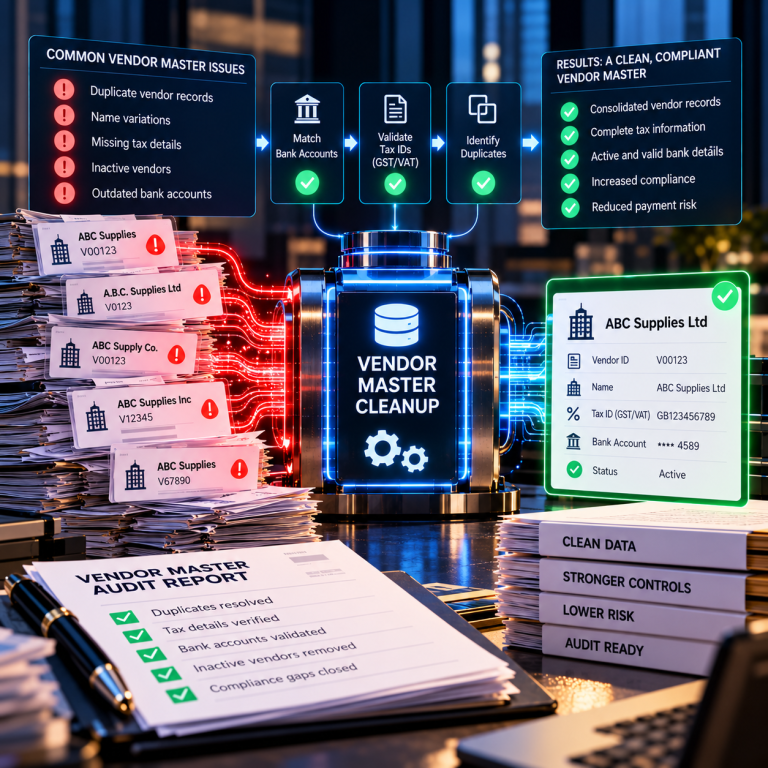

Vendor master data is the reference file your ERP uses to identify who you pay. When fields are incomplete, your accounts payable process loses its ability to prevent the most common type of duplicate payment.
The mechanism is straightforward. An invoice arrives from a supplier. The AP clerk searches for the vendor record by name. The existing record is missing a remittance address, or the tax ID field is blank, or the bank details are incomplete. The clerk cannot process payment using that record. Creating a new vendor ID is faster than submitting a master data change request and waiting for approval. The new record gets a different vendor number. The system now sees two separate payees where one supplier exists.
When the next invoice arrives, whichever record the clerk finds first gets used. If that invoice is a duplicate of one already paid under the other vendor ID, your ERP duplicate payment controls will not fire. Those controls check vendor ID plus invoice number plus amount. Different vendor ID means no match detected.
Which Fields Matter Most
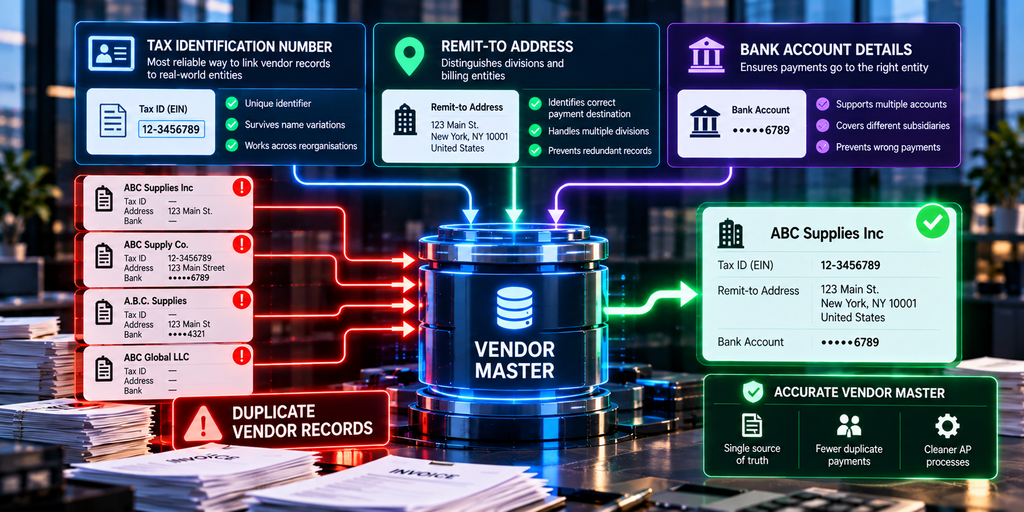
Tax identification numbers are the most reliable way to link vendor records to real-world entities. When this field is empty, you lose the one unique identifier that survives name variations, address changes, and internal reorganisations at the supplier.
Complete remittance addresses are the second critical field. Suppliers with multiple divisions or billing entities often share a name but require different payment destinations. Without full address data, AP teams cannot distinguish between them and may create redundant records or send payments to the wrong location.
Bank account details for electronic payments create the same problem. A supplier may have multiple accounts for different subsidiaries. If your vendor master only captures the primary account, payments for other subsidiaries must either go to the wrong account or trigger a new vendor setup.
Purchase order matching logic also depends on complete vendor master data. If your procurement system uses one vendor number format and your AP system uses another, PO-based invoices may not match automatically, forcing manual intervention and increasing the chance of duplicate setups.
Why Incomplete Records Persist
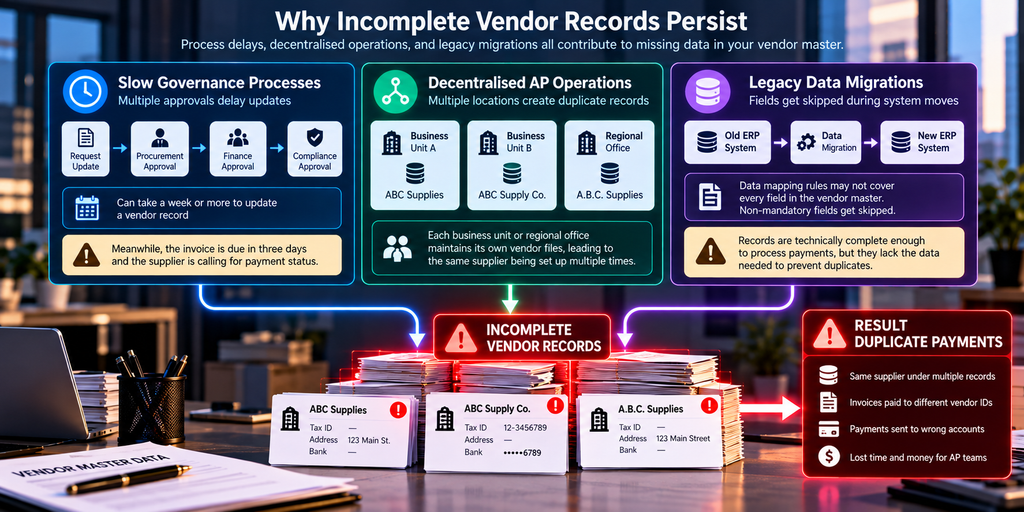
Master data governance processes move slowly. Updating a vendor record may require approval from procurement, finance, and compliance teams. The workflow can take a week or more. Meanwhile, the invoice is due in three days, and the supplier is calling for payment status.
Decentralised AP operations multiply the problem. When each business unit or regional office maintains its own vendor files, the same supplier may be set up independently in multiple locations. Mergers and system consolidations inherit all of those records, often with no deduplication effort.
Legacy data migrations frequently leave fields empty. When companies move from one ERP platform to another, data mapping rules may not cover every field in the vendor master. Non-mandatory fields get skipped. The migrated records are technically complete enough to process payments, but they lack the data needed to prevent duplicates across the entire file.
How This Appears in Transaction Data
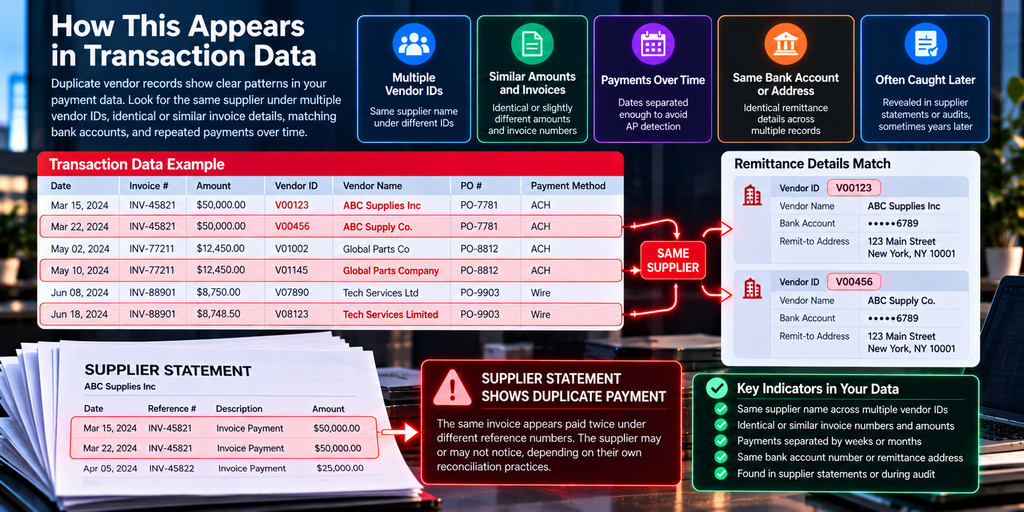
You will see the same supplier name appearing under multiple vendor IDs. Amounts and invoice numbers may be identical or vary slightly due to currency conversion, early payment discounts, or partial billing. Payment dates are usually separated by enough time that AP staff do not notice the repetition.
Remittance advice documents provide another clue. If the same bank account number or mailing address appears across different vendor IDs, those records represent the same payee. Your ERP does not cross-reference this information during payment processing.
Supplier statements sometimes reveal the issue when they show one invoice paid twice under different reference numbers. The supplier may or may not notice, depending on their own reconciliation practices. Many duplicates remain outstanding for months or years until discovered through audit.
What Recovery Audits Do Differently
Recovery audits apply entity-matching algorithms that reconstruct supplier identity using tax IDs, bank details, addresses, and name variations. This process treats the vendor master as unreliable source data and builds a separate mapping of which vendor IDs correspond to which real-world entities.
Once duplicate vendor records are identified, the transaction history is re-examined for payments that match on invoice number, amount, and date but were processed under different vendor IDs. These are the duplicates your system could not catch because the vendor ID mismatch prevented the duplicate payment control from triggering.
Fintralis works across SAP, Oracle, and JD Edwards environments at companies with $50 million or more in annual accounts payable spend. We recover duplicate payments on a contingency basis — you pay only on funds returned. If your vendor master data has gaps and your AP volume is high enough, those missing fields are creating duplicate payments right now.
Frequently asked questions
How do missing vendor master data fields cause duplicate payments?
When critical fields like tax ID or remittance address are missing, AP teams cannot match incoming invoices to the existing vendor record. They create a new vendor ID for the same supplier, and the system treats it as a different payee, allowing a second payment for the same invoice with no duplicate detection warning.
What vendor master data fields are most commonly incomplete?
Tax identification numbers, complete remittance addresses, bank account details for EFT payments, and subsidiary or division-level entity identifiers are the most frequently missing fields. Purchase order matching logic also fails when vendor number formats differ across business units within the same ERP instance.
Can ERP systems detect duplicates when vendor records are incomplete?
Standard duplicate payment controls check invoice number, amount, and vendor ID combinations. When the vendor ID differs because of a second master record, the system sees no match and processes the payment. The duplicate exists at the supplier entity level, which the software cannot see without complete tax ID or DUNS number fields.
Why do AP teams create new vendor records instead of updating existing ones?
Updating master data often requires approval workflows that take days or weeks, while invoice payment deadlines are immediate. When a remittance address is missing or a new division needs to pay the same supplier, creating a new vendor ID is faster than waiting for master data governance processes to complete.
How often do duplicate vendor records exist in large ERP systems?
The rate varies by organisation, but companies with decentralised procurement and multiple ERP instances or business units typically have the highest incidence. When vendor master data maintenance is delegated to individual AP clerks rather than centralised, the same supplier may exist under five or more distinct vendor IDs across the system.
What happens during an AP recovery audit when vendor master data is incomplete?
Recovery audits reconstruct supplier entity identity using tax identification numbers, banking details, and address matching algorithms that go beyond what the ERP duplicate checks perform. This reveals payments made to the same supplier under different vendor IDs, which then become candidates for recovery if the duplicate payment terms have not been met.