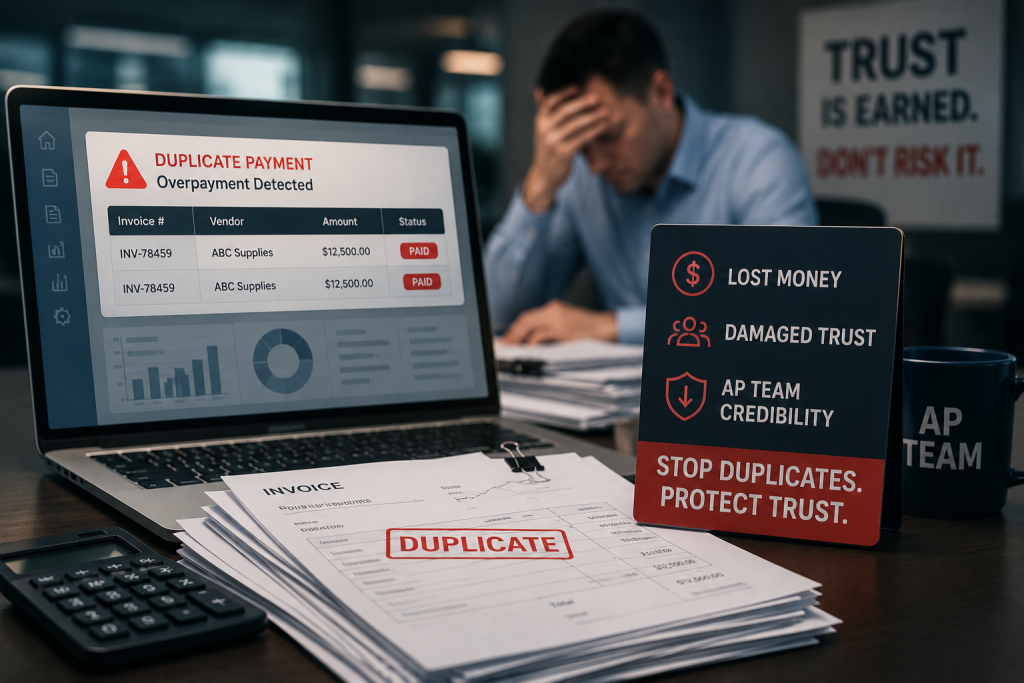
Duplicate payments are one of the most common and preventable drains in accounts payable. They happen quietly, often without triggering alarms until a vendor calls to say thank you or an internal auditor runs a file comparison months later. The cost is real, but the reputational damage can be worse: duplicate payments signal weak controls, and that message travels inside and outside the organisation.
Why duplicate payments happen
The mechanics are straightforward. A vendor submits an invoice by email. Two weeks later the same invoice arrives by post. Your AP team codes and enters each one under different document numbers, and both sail through approval. The payment run processes them both. The vendor says nothing, because why would they.
Vendor master-data changes create another common path. A supplier updates their legal entity name or tax registration after a merger, and your procurement team creates a new vendor record instead of amending the old one. The same invoice now has two valid vendor codes in your ERP. If the invoice number itself is generic or recycled, there is nothing obvious for the system to flag.
High invoice volume compounds the problem. When your AP team processes hundreds of line items each day across multiple entities, company codes or ERP instances, perfect vigilance becomes impossible. Manual spot-checking catches some duplicates, but only if someone thinks to look in the first place.
Where ERP controls fall short

SAP, Oracle and JD Edwards all offer duplicate-invoice checking. These routines typically compare invoice number, vendor ID and sometimes amount or date. That works well when a vendor resubmits the exact same reference. It does not work when the vendor uses a generic invoice numbering scheme, when slight formatting differences confuse the match logic, or when the invoice crosses company codes that do not share real-time master data.
Three-way matching helps by linking invoices to purchase orders and goods receipts, but many organisations only enforce it above a threshold. Below that limit, invoices are paid on two-way match or even invoice-only approval. This is where most duplicate-payment risk concentrates.
Workflow segregation is another control that helps in theory. If the person who enters invoices cannot also release payments, you reduce the chance of deliberate duplicates. But accidental duplicates — the kind caused by data-entry error or timing overlap — bypass that control entirely.
Multi-ERP environments multiply the risk
If your organisation runs SAP in one region and Oracle in another, or operates a mix of on-premise and cloud instances, cross-system duplicate checks require custom integration. Most finance teams do not have that integration in place, so an invoice paid in one system might be paid again in another with no automated flag.
How to prevent duplicates before they reach payment run
Prevention starts with tightening your invoice-entry controls. Require AP staff to search existing records by vendor tax ID and approximate amount before creating a new line. This simple habit catches many re-entries at source.
Enable and enforce ERP duplicate-check routines at the most granular level your system supports. If your platform allows fuzzy matching of vendor names or invoice numbers, turn it on. The false-positive rate is usually manageable, and the time spent investigating a flagged duplicate is far shorter than the effort to recover a paid one.
Use optical character recognition and data-extraction tools to pull vendor name, tax ID, invoice number, date and amount from scanned documents. These tools can compare each new invoice against your paid-file history in seconds and flag potential matches for manual review. The technology is mature and available as modules within most modern AP automation suites.
Establish a monthly or quarterly file review where someone outside the AP team compares payment registers by vendor and amount. Sorting your payment export by vendor, then by net amount, will surface many duplicate pairs immediately. This does not prevent the payments, but it shortens the window before you catch them.
Recovering duplicates once they slip through
When a duplicate payment is confirmed, the recovery process is usually straightforward but time-consuming. Your AP team sends the vendor a formal letter stating the date, invoice number, amount paid and remittance reference of each payment, and requests a refund of the duplicate. Most vendors respond within a month, often by returning a cheque or issuing a credit note against future invoices.
Some do not respond at all. Others dispute the duplicate, especially if their records show only one payment received due to their own internal reconciliation gaps. In these cases you need copies of cleared cheques, electronic-payment confirmations and bank statements to prove both payments cleared.
The recovery effort becomes impractical when the amounts are small or the vendor is no longer active. Many finance teams establish a materiality threshold below which they do not pursue recovery. That threshold is a judgement call, balancing the cost of internal time against the value recovered.
When to use a third-party recovery service
If your AP volume is high, the backlog of unreviewed payments is deep, or your team lacks bandwidth for systematic file analysis, a contingency-based recovery service can make sense. These services compare your entire payment history against itself and against vendor master records, identify probable duplicates, handle correspondence with vendors and track repayments. You only pay a percentage of actual cash recovered, so there is no upfront cost or risk.
Building a culture that prevents duplicates
Technology and process matter, but culture matters more. When your AP team understands that duplicate payments undermine the credibility of the entire finance function, they treat prevention as a professional responsibility, not just a compliance tick-box.
Regular training on how duplicates happen and how to spot them keeps the issue front of mind. Sharing anonymised examples from your own organisation makes the risk concrete. Recognition for staff who catch duplicates before payment reinforces the behaviour you want.
Duplicate payments are a solvable problem, but only if you treat them as one. If you would like to understand what duplicates might exist in your own payment files, Fintralis runs file-based recovery audits on a fully contingent basis across SAP, Oracle and JD Edwards environments. You only pay if we recover cash.
Frequently asked questions
How do duplicate payments happen in accounts payable?
Duplicate payments happen when the same invoice is entered twice under different reference numbers, paid once to an old vendor record and once to a new one after a master-data change, or submitted by the vendor in two formats such as paper and email. Workflow gaps and multiple ERPs make these harder to catch before payment run.
What controls prevent duplicate invoices from being paid?
The most reliable controls are automatic matching against paid-invoice history by vendor tax ID and amount, three-way matching that flags any purchase order referenced twice, and segregation of duties so the person entering invoices cannot approve payment. Manual spot checks catch edge cases that automated rules miss.
Can AP automation software eliminate duplicate payments entirely?
AP automation significantly reduces duplicate payments by scanning invoice images for duplicate vendor names, amounts and dates, but no system catches everything. Invoices with minor differences in formatting, timing or entity structure still slip through. A complete solution combines software with periodic file review and recovery audits.
How do you recover duplicate payments once they are made?
Recovery starts with matching payment files against invoice history by vendor tax ID, date range and net amount to identify duplicate pairs. Once confirmed, the AP team sends a polite but formal letter requesting repayment, often with a cheque already enclosed from the vendor’s own remittance. Most vendors refund within thirty days. Third-party specialists handle this on contingency when internal teams lack bandwidth.
Why do duplicate payments still happen in SAP and Oracle?
Enterprise ERPs like SAP and Oracle can process tens of thousands of invoices each month across multiple company codes, modules and subsidiaries. Even with duplicate-check routines enabled, vendor master records, slight invoice-number variations and timing differences create gaps. Many duplicate payments are also human entry errors that bypass system controls entirely.
How much do duplicate payments typically cost a company?
The actual cost depends on payment volume and control maturity. A company processing fifty million in annual AP spend might carry five-figure exposure at any point, though the exact figure varies. The real damage is not just the cash leakage but also the time AP staff spend reconciling and the credibility loss when vendors notice the error first.